@tomatopi We are still working on documentation. I know it has been a very slow process but we are adding what we can to the doc sites (v4 and v5) as well as adding scripts to our script-examples in GitHub.
 J
Offline
J
Offline
Please Note This forum exists for community support for the Mango product family and the Radix IoT Platform. Although Radix IoT employees participate in this forum from time to time, there is no guarantee of a response to anything posted here, nor can Radix IoT, LLC guarantee the accuracy of any information expressed or conveyed. Specific project questions from customers with active support contracts are asked to send requests to support@radixiot.com.
-
RE: Help with ideas for how to guide
-
RE: Schedules that end at 12AM do not return to normal
We have an internal ticket to review this issue. I will update with findings, no need to send an additional ticket. Thank you.
-
Radix IoT at Yotta Show - Las Vegas, Sep 29-30
The Radix IoT team is at the Yotta Show this week at Caesars Forum in Las Vegas. The show floor runs Sep 29-30, and we're at Booth 1115.
Tonight (Sep 28) there's a networking event ahead of the show floor opening. If you're in Las Vegas for Yotta or otherwise, stop by the booth once the floor opens or reply here and we'll set up time to connect.
-
BACnet Secure Connect (BACnet/SC) in BACnet4J 7.0.0 - What's There and What's Missing
BACnet4J 7.0.0 has landed with an implementation of BACnet Secure Connect (BACnet/SC). Worth knowing about, but also worth being clear-eyed on what it does and doesn't cover yet.
What's there:
- BACnet4J can now act as an SC node connecting to a Hub. If you already have a BACnet/SC Hub Function on your network (from another vendor's device or software), BACnet4J can join it as a node.
- Alongside it, 7.0.0 brings a batch of spec-compliance work: protocol revision bumped to 20 (with further fixes toward revision 30 compliance), a rewritten segmentation handler (clause 5.4 / addendum 135-2020ch-1), stricter decoding of malformed messages, and the new NetworkPortObject and related structures from the 2024 spec.
What's missing:
- No Hub Function. BACnet4J only implements the node side of BACnet/SC. It cannot act as the SC Hub itself, so you still need a separate Hub (another BACnet/SC device or product) for nodes to connect through.
- Not in Mango yet. This is 7.0.0 of the standalone BACnet4J library. Mango's BACnet data source currently ships BACnet4J 6.1.1 (as of Mango 5.6.11 / 5.7.5). BACnet/SC support has not been integrated into the Mango data source or local device configuration, so you can't configure it from the Mango UI today. That's a separate piece of work from the library update.
- 7.0.0 is a breaking release. If you consume BACnet4J directly in your own code, this version carries a long list of breaking API changes (Unsigned32 vs UnsignedInteger, renamed classes, changed exception types, stricter decoding that can now fail reads that previously "succeeded" with garbage data). It's not a drop-in upgrade from 6.x.
If BACnet/SC support in Mango itself is something you need, let us know in this thread.
Repo and full release notes: github.com/RadixIoT/BACnet4J
-
Security Advisory: Upgrade to Mango 5.6.12 or 5.7.5
Mango 5.6.11 / 5.6.12 (Aug 25 and Sep 1, 2026) and Mango 5.7.5 (Aug 25, 2026) contain fixes for several security issues. If you're running an earlier version on either line, we recommend upgrading as soon as your maintenance window allows.
Affected versions: All 5.6.x releases prior to 5.6.11, and all 5.7.x releases prior to 5.7.5.
Vulnerabilities fixed:
- Privilege escalation (core). Any user with a script engine permission could evaluate scripts with arbitrary roles, including superadmin.
- Path traversal (core). File store operations did not reject paths that traverse a symbolic link pointing outside the file store. A symlink placed inside a file store could be used to escape it.
- Modbus serial permission bypass (modbus-ds). The Modbus serial locator, serial write, and scan tools did not require the data source permission, unlike their IP equivalents. Any authenticated user could write to serial Modbus devices or trigger scans.
- BACnet denial of service (bacnet-ds). A malformed or malicious BACnet message could trigger an infinite loop. Fixed by upgrading BACnet4J to 6.1.1.
- Dependency CVEs. A broad set of third-party libraries were updated to patched versions, including Spring Framework, Spring Security, Jetty, Netty, Jackson, PostgreSQL JDBC, jOOQ, log4j, BouncyCastle, and Apache HttpComponents. lz4-java was upgraded to 1.11.1, fixing CVE-2026-59949 (a native-code JVM crash), and Spring LDAP was upgraded to address CVE-2026-41720.
Breaking changes to review before upgrading:
- Evaluating a script while requesting roles the caller does not hold now fails with a permission error instead of being silently allowed. If any of your scripts request roles beyond what the calling user holds, update them before upgrading.
- (5.7.5 only) The REST API now ignores the read-only id property in request bodies. Object identity comes from the URL path or xid instead.
- (5.6.11 only) BACnet REST serialization of CharacterString values now represents the character encoding as an object rather than a byte.
Also in 5.6.12: a fix for OAuth 2.0 / OpenID Connect logins resetting a user's roles to user when oauth2.client.registration.{registrationId}.userMapping.roles.sync is set to false. Roles assigned by an administrator in Mango are now preserved across logins.
As with any upgrade, back up your database and configuration first and test in a non-production environment before rolling out to production. Full details are in the 5.6.x and 5.7.x release notes.
-
How to Find What You Need on the New Documentation Site (docs.radixiot.com)
Radix IoT's documentation has moved to a single, unified site: docs.radixiot.com. There's no separate v3 or v4 documentation anymore. Everything lives in one place now.
Sections:
- Getting Started: installing Mango by Radix IoT, configuring your first data source, connecting your first device
- Data Sources: OPC UA, Modbus, BACnet, MQTT, SQL, and 20+ industrial protocols
- Configuration: publishers, event handlers, scripting engines, system settings
- User Guide: data points, alarms, events, reports, dashboard designer
- Administration: backups, database, diagnostics, logging, upgrades
- Security: SSL/TLS, OAuth 2.0, user permissions, audit trails
- Developers: REST API reference, module development, tutorials
- Hardware: IO expansion tools and hardware integrations
- Release Notes: per-series changelogs for every Mango 5.x release
There's a search bar in the header if you'd rather jump straight to a topic than browse.
If you run into a page that's missing something or out of date, flag it here. The site is actively maintained.
-
Release Notes for Mango 5.7.x
Summary of the Mango 5.7.x series (5.7.0 – 5.7.4). Full changelogs are on the documentation site.
- 5.7.0 (Apr 28, 2026) — Major release: Spring 7, Jetty EE11, and Jackson 3 upgrades; new open-source OPC UA data source built on Eclipse Milo; Maven-based upgrade delivery with PGP signature verification. Breaking changes: five modules removed (Control Core, Environment Canada, log4jDS, MangoIOTools, MangoES Configuration), CSRF now enforced on /httpds and /haystack, and the default gRPC service permission changed from superadmin-only to all users. Third-party modules built against 5.6.x APIs will not load — review the upgrade guide before moving to this series.
- 5.7.1 (May 13, 2026) — Same ClickHouse/TSL driver upgrade as 5.6.6; Excel report rollups now work correctly on TSL-backed installations.
- 5.7.2 (Jun 29, 2026) — Major camera-streaming overhaul: substantially lower CPU usage, smoother live video, more reliable connections; fixed a 5.7.0 regression that could crash the web server into a restart loop on certain blank mango.properties values.
- 5.7.3 (Jul 15, 2026) — Added OPC UA write-back support; isolated SNMP v3 credentials per target (security fix); fixed several data-source startup and event-handling issues.
- 5.7.4 (Aug 12, 2026, latest) — Added OAuth 2.0 bearer-token role-claim mapping; fixed a silent logging failure that could stop all logging on 5.7.0–5.7.3 after a runtime config reload (worth an immediate upgrade if you're on those versions); EMS/Platform Manager permissions are now enforced server-side rather than in the browser.
If you're upgrading from 5.6.x, read the 5.7.0 breaking changes carefully — this is a major-version-style jump for modules and integrations even though it's numbered as a minor release.
-
Release Notes for Mango 5.6.x
Summary of the Mango 5.6.x patch series (5.6.0 – 5.6.10). Full changelogs are on the documentation site.
- 5.6.0 (Dec 1, 2025) — Java 25 build support (Java 17 remains minimum), new Prometheus metrics endpoint, gRPC publisher offline queuing, multi-level email escalation, redesigned event-handler management UI.
- 5.6.1 (Dec 5, 2025) — Fixed the Users page loading all rows and producing infinite queries; fixed a circular-dependency exception on startup when an active event exists in the database.
- 5.6.2 (Dec 15, 2025) — Jetty upgraded to 12.1.5, resolving stale file content being served after on-disk changes; several EMS device-details fixes.
- 5.6.3 (Feb 19, 2026) — Improved NoSQL (ias-tsdb) "reload links" performance; EMS/Platform Manager filtering and UI fixes; Modbus tools UI now supports multi-select.
- 5.6.4 (Mar 10, 2026) — radix-tsl upgraded to 0.5.2 with multi-series query support; EMS null-check fixes.
- 5.6.5 (Mar 23, 2026) — Made ClickHouse FINAL query behavior optional for better performance; fixed gRPC publisher dropping inactive events re-raised after a crash.
- 5.6.6 (May 13, 2026) — ClickHouse JDBC driver moved to the official upstream release with retuned table defaults, improving ingest and query performance on TSL-backed installs. Requires manually migrating existing tables to take effect — see the docs before upgrading.
- 5.6.7 (Jun 16, 2026) — Fixed a startup issue affecting Modbus serial (ASCII/RTU) data sources.
- 5.6.8 (Jun 23, 2026) — Fixed a Cloud Connect user-sync bug that could break the client's web interface; breaking change: MySQL row-by-row result streaming removed (db.fetchSize=Integer.MIN_VALUE is no longer valid), backported from 5.7.
- 5.6.9 (Jul 22, 2026) — Fixed several data sources (ASCII File, Data File, TCP/IP) failing to register on startup; fixed BACnet/Modbus/gRPC write-back events not firing; fixed a Watchlist JSON import bug dropping chart configuration.
- 5.6.10 (Aug 4, 2026, latest) — Fixed chart data stopping updates when 3+ points are selected without combine-values.
As always, review the full release notes for your upgrade path before updating a production system.
-
Radix IoT at Upcoming Trade Shows — 2026 Schedule
Hi everyone,
The Radix IoT team will be at the following events for the rest of 2026. If you're in the area — whether or not you're attending the show itself — reply below or reach out to your account rep and we'll do our best to set up time: a quick coffee, a sit-down meeting, or a visit to see your Mango by Radix IoT deployment in person.
Upcoming Events:
- RE+ MidAtlantic — Philadelphia, PA (Pennsylvania Convention Center) — Aug 12–13, 2026 — Booth 1005
- AEE World Conference and Expo — Orlando, FL — Sep 16–18, 2026 — Booth 308
- Yotta Show — Las Vegas, NV (Caesars Forum) — Sep 28–30, 2026 — Booth 1115
- Smart Buildings — London, UK (ExCeL) — Oct 14–15, 2026 — Booth A17
- DCD Connect — Lansdowne, VA (Lansdowne Resort & Spa) — Nov 3–4, 2026
- IFMA World Workplace — Anaheim, CA — Nov 17–19, 2026 — Booth 1015
-
Radix IoT Has a Brand New Website - Come Check It Out!
Hey Mango community,
We're excited to share that Radix IoT has launched a brand new website! We've put a lot of work into making it cleaner, easier to navigate, and a better reflection of everything we've been building.
Whether you're a long-time Mango user or just getting started, head over and take a look. You'll find:
- Updated product information
- Improved navigation and layout
- Resources to help you get the most out of Mango
Check it out at Radix IoT and let us know what you think!
-
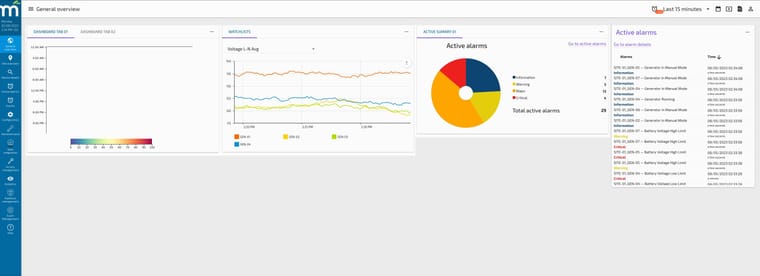
Anyone using Portfolio Manager (Pi‑Portfolio)? Looking for feedback
Hey everyone,
I wanted to see if anyone here has started using Portfolio Manager (Pi‑Portfolio) and would be willing to share their experience so far.
Specifically, I’m curious:- How you’re using it today (internal ops, customer reporting, multi‑site rollups, etc.)
- What’s working well
- Any challenges or gaps you’ve run into
- Features you’d like to see improved or expanded
For reference, this is the documentation site Pi‑Portfolio is based on:
👉 https://docs.radixiot.com/docs/developers/tutorials/pi-portfolio/
If you’ve had hands‑on time with it—even in a limited or test capacity—I’d love to hear your thoughts.
Thanks in advance.
-
RE: New Update - Guest Access - Permission Issues?
@mihairosu FYI - Image issue with the forum has been fixed.